The layers behind a useful application
Trace a web request through DNS, TLS, proxies, the application and its database, then follow the checks that make a release dependable.

Kareem Schultz
Technology enthusiast & systems builder · Guyana
Jump to a section
The first screen hides a whole system
A useful web application should feel boring in the best way: the page opens, the controls respond, the right data appears and the user does not have to think about the machinery behind it. Yet even a simple calculator or interactive map depends on several independent systems doing their jobs at the same time.
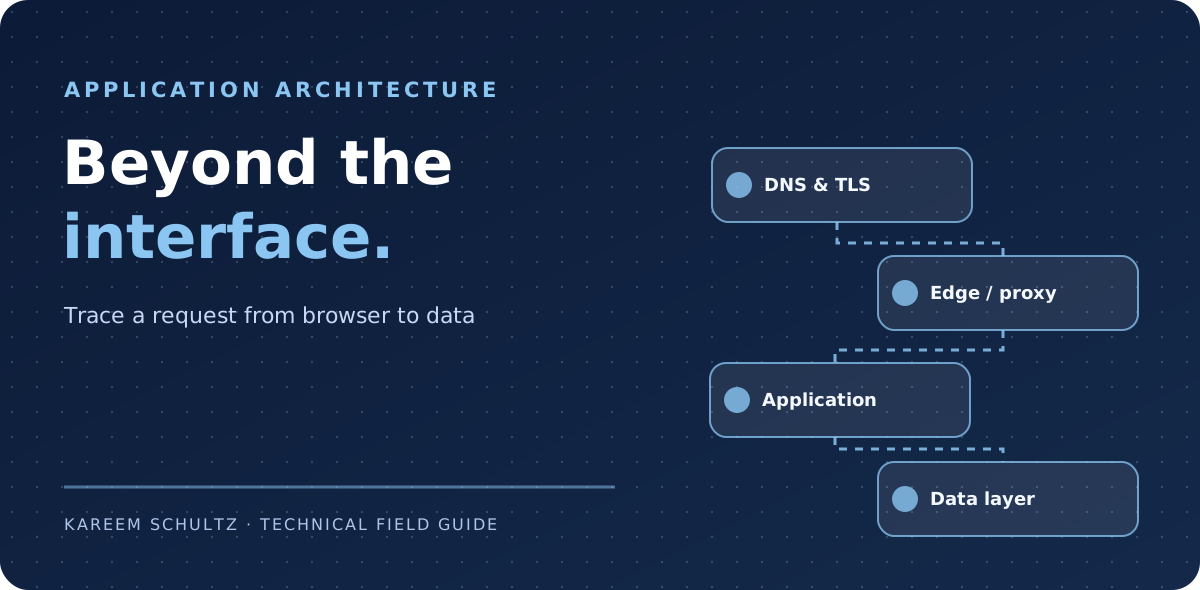
It helps to imagine one request travelling from a phone to a hostname, across a network, through the web edge and into an application. The answer may come from a cache, a service or a database. Each stage has a different owner, failure mode and useful diagnostic. Treating these stages separately makes a vague “the website is down” report much easier to investigate.
The interactive request explorer below is a sample architecture with no connection to a live system. Select a stage to see what it does, a symptom you might encounter and a way to investigate it.
The request path, one boundary at a time
DNS answers where a name should resolve. The browser then establishes a connection and, for HTTPS, negotiates TLS with the endpoint that terminates the connection. A reverse proxy or edge service may handle caching, routing, security controls and forwarding to an origin. An application checks identity and permissions before using persistent data.
Those responsibilities should not be blended into one health check. A DNS issue can make a perfectly healthy application unreachable. A proxy might return a 502 when the origin is unavailable. An application can return 200 for its homepage while a critical API is failing. And a database can be responsive yet return the wrong rows when authorization is incorrect.
| Layer | Questions to ask | Useful signal |
|---|---|---|
| DNS | Does the hostname resolve to the intended endpoint? | Records and resolver answers |
| Network & TLS | Can the connection establish with a valid certificate? | Connect errors, expiry and handshake failures |
| Edge / proxy | Is the correct route forwarded or served from cache? | Upstream codes, request IDs and cache status |
| Application | Are auth and business rules behaving as intended? | Traceable errors and functional health checks |
| Data | Can authorized users read and write the right records? | Query failures, migrations and access checks |
A read-only troubleshooting walk-through
Suppose a hypothetical site at app.example.com is reachable on one device but times out on another. Start by comparing DNS results and testing the actual HTTPS endpoint. Only after the path is understood should you move to application logs and database health. Avoid repeatedly restarting services without evidence; that can erase the symptom you need to understand.
Commands below are illustrative and non-destructive. A HEAD request can differ from a GET request, so confirm with an actual permitted application flow if the response is unexpected. Treat test hostnames as examples, not reachable production targets.
The backend is a contract, not just a collection of routes
Once the request reaches the application, the difficult questions tend to be about correctness: who may make the change, what is validated, how concurrent requests behave and what can be recovered after failure. A good data model makes these questions explicit rather than leaving every screen to improvise.
A create operation might fail after the server commits a record but before the client receives confirmation. Without an idempotency strategy, a retry could create a duplicate. A user might own one organization but try another organization identifier. Without server-side authorization, a filtered interface is not enough protection.
I prefer the principle that the interface shows the workflow clearly and the backend enforces its invariants consistently. Validation, permissions, audit events and meaningful error messages belong at the service boundary.
Choose the right place for each responsibility
Static pages and cacheable public assets often belong close to the user at an edge or CDN. Sensitive mutations, transaction handling and authorization belong in a trusted application service. Persistent databases require dependable migrations, backups and access policies. Background tasks need retries and dead-letter or reconciliation paths where appropriate.
There is no requirement that every small app adopt queues, microservices or multiple databases. Extra moving parts add cost and more places for failure. Begin with the simplest architecture that can enforce the important rules, then add components when the workload or a real operational need justifies them.
| Need | Often a good starting point | Watch for |
|---|---|---|
| Public informational page | Static or cached response | Stale content and cache invalidation |
| Account-specific action | Authenticated service endpoint | Object-level authorization |
| Durable records | Transactional database | Migrations and restore capability |
| Slow asynchronous work | Queue or durable job | Retries, duplicate delivery and visibility |
| Release monitoring | Health checks and correlated logs | Checks that are green but incomplete |
Reliability starts before the deploy button
A healthy deployment pipeline records which source revision was reviewed and which artifact was built from it. Tests should exercise important invariants, not just whether a build finishes. Staging can reveal environment-specific failures, and a post-deploy smoke test should confirm that the real domain serves the intended version.
AWS and Microsoft both emphasize small reversible changes, observability and well-understood recovery procedures. A workflow can be automated and still be unsafe if it releases the wrong commit, lacks secrets hygiene or does not verify the public endpoint.
- Build from an identifiable source revision and preserve artifact provenance.
- Run tests that represent the workflows people actually depend on.
- Protect production deployment credentials and scope their access.
- Verify the public hostname and a representative read/write flow after deployment.
- Keep a rollback or forward-fix procedure and document which one was used.
A practical debugging matrix
A short, well-kept runbook is more valuable than a very large dashboard that nobody trusts. Record the expected path, service owner, last known-good deployment, and the checks that distinguish each failure class. The first question should be “where did the expected behavior stop?” rather than “which server can we restart?”
| What the user sees | Possible layer | First check |
|---|---|---|
| Name does not resolve | DNS | Authoritative record and resolver output |
| Certificate warning | TLS / edge | Expiry, hostname and chain |
| 502 or 504 response | Proxy or origin | Upstream health and request correlation |
| 403 on one resource | Authorization | Actor, resource ownership and policy |
| Save succeeds twice | Application / data | Retry handling and idempotency |
| UI opens but data is stale | Cache or data path | Cache headers and source freshness |
Design the complete experience, not only the UI
The best application architecture is visible in its behavior: a page explains a failure clearly, a retry is safe, a permission denial is understandable, and an operator has enough evidence to investigate. The design of these boundaries is as much part of the user experience as typography or animation.
I am interested in the meeting point between networks, services, databases and interfaces. Making those layers dependable is what turns an interesting prototype into software someone can trust.
Sources & further reading
These links provide the technical basis for the article. Check upstream advisories and documentation for revisions.