Planning a homelab that actually teaches you something
Build a small, intentional lab with VLANs, virtualization, NAS storage and recoverable backups—and learn from each failure without risking your everyday network.

Kareem Schultz
Technology enthusiast & systems builder · Guyana
Jump to a section
Begin with a question, not a shopping cart
A lab does not need a rack full of servers to teach useful things. One manageable host, a network you understand and a realistic backup target can be a better classroom than a collection of services nobody knows how to restore.
The first design decision is what you want to learn. Maybe it is why VLANs isolate one type of device from another, how a VM differs from a container, how a NAS dataset survives a drive failure or how an application comes back after a bad update. Write down a small outcome, a test and a way to undo it.
The interactive lab planner below separates network, compute, storage and recovery responsibilities. It deliberately models a small example rather than presenting a universal shopping list.
Start with network boundaries
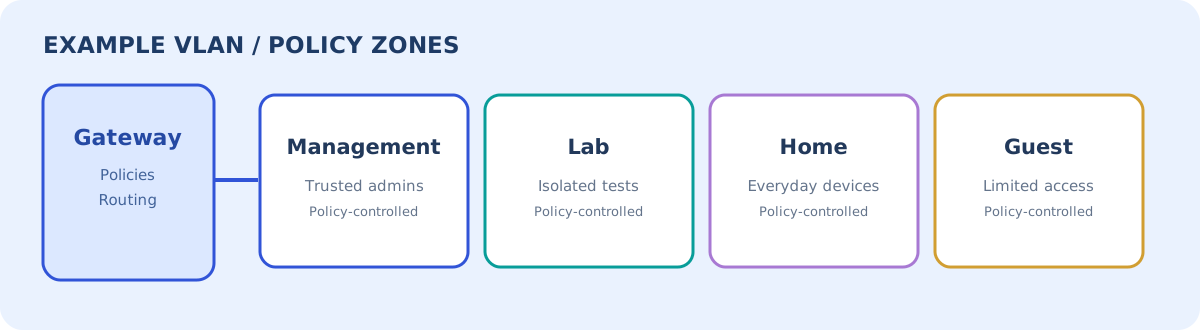
A sensible first topology might have a trusted management network, an isolated experiment network, a guest or IoT network and everyday client devices. VLAN tagging alone does not create a complete security policy; the gateway or other enforcement point must decide which traffic can cross a boundary.
On UniFi networks, gateway zone-based rules, network isolation, switch ACLs and AP client isolation operate at different layers. The right choice depends on where traffic moves. A guest portal also does not automatically mean the guest is isolated from private systems.
Plan DNS, DHCP and essential discovery flows deliberately. If you isolate every segment but forget how a device discovers an authorized service, you may be tempted to defeat the boundary entirely. Better to document the exceptions you actually need.
| Illustrative zone | Typical devices | Default intent |
|---|---|---|
| Management | Hypervisor, switches, AP administration | Reachable only by trusted administrators |
| Lab | Test VMs and containers | Restricted access to production and home devices |
| Home / clients | Phones, laptops, everyday applications | No unneeded access to management interfaces |
| Guest / IoT | Visitors and limited-function devices | Internet or approved services only |
Proxmox, virtual machines and containers
Virtualization gives you inexpensive mistakes: clone a test VM, change its configuration, and compare behavior without rebuilding the host. A full VM has its own kernel and stronger isolation boundaries; OS containers share a host kernel and tend to use fewer resources, but their trust model is different.
Start with a hypervisor you can operate, a small test Linux VM and a service that can be reinstalled from documented steps. Practice a clean shutdown, a reboot, storage exhaustion and a recovery. Do not assume a hypervisor snapshot is a durable, independent backup.
Proxmox documentation distinguishes file-level and block storage and explains the implications for snapshots, shared storage and migration. Storage layout is a design choice, not a benchmark of expertise.
| Workload | Possible lab environment | Trade-off |
|---|---|---|
| Linux networking experiment | VM | Isolation with greater resource overhead |
| Lightweight, trusted Linux service | Container or VM | Simplicity and host-kernel risk differ |
| Firewall or router experiment | Dedicated hardware or isolated VM | Avoid breaking the household gateway |
| NAS exploration | Dedicated NAS or carefully designed VM | Storage passthrough, recovery and failure domains |
Storage: redundant does not mean protected
RAID or a mirrored pool can help a system continue functioning when some hardware fails. It cannot automatically undo mistaken deletion, bad synchronization, ransomware, fire, controller loss or an operator error. Snapshots can make a rollback convenient, but snapshots on one pool may disappear with that pool.
A more dependable strategy gives irreplaceable data independent copies, different failure domains, appropriate encryption and a restore test. An off-site destination matters because a copy stored beside the original can share the same outage or compromise.
TrueNAS distinguishes replication between local pools and remote systems. When a database runs inside a VM or container, a filesystem snapshot may not provide an application-consistent recovery point by itself; include the application’s own backup/export procedure where necessary.
| Mechanism | Helps with | Does not automatically solve |
|---|---|---|
| RAID / mirror | Some drive failures | Accidental deletion or site loss |
| Local snapshot | Rapid rollback of selected changes | Failure of the entire storage pool |
| Remote replication | Copying snapshots to another system | Application consistency and independently tested recovery |
| Encrypted off-site backup | Disaster recovery and separate retention | A restore process nobody has practiced |
What I would deploy first
The first milestone is not a dashboard full of apps. It is a lab whose important details you can reconstruct. Create a simple diagram, define which network holds management, establish who can log in, and make a baseline backup. Then deploy one non-critical service.
Avoid expanding every possible category in the first weekend. Add monitoring only after you know which failures matter, and add orchestration only after the individual services have repeatable configurations. Ansible and version-controlled configuration can reduce hand-entered drift; they do not replace understanding what each playbook changes.
A deliberately small learning sequence
Try a sequence where every exercise has an observable answer. First, confirm the lab VM has the expected IP and DNS resolution. Next, verify a guest client cannot reach the management interface. Then configure a test service behind a reverse proxy and inspect the HTTP response. After that, restore a backed-up file and observe what monitoring records during a simulated outage.
The forum lesson that comes up repeatedly is mundane but important: write down what you changed. When an experiment breaks months later, a diagram and a small runbook are more valuable than a memory of which commands may have been typed.
- Network: prove intended access works and unintended access is blocked.
- Compute: install and rebuild a test VM from notes.
- Storage: measure capacity and perform a recoverable snapshot exercise.
- Backup: restore from an independent location.
- Operations: verify the alert when something is unhealthy and the recovery notification afterward.
The hidden costs: power, heat, noise and responsibility
Equipment that is inexpensive to buy can become expensive to run. Consider idle power use, UPS requirements, fan noise, heat and cooling. Do not assume that an always-on rack is the only serious way to learn. A small low-power system can teach most of the software and networking concepts.
Also think about the blast radius of an experiment. Keep administrative credentials separate, do not expose a management interface directly to the public internet, and prefer remote access through a reviewed VPN or equivalent secure access path.
What a successful lab actually proves
The strongest milestone is not how many icons appear on the dashboard. It is whether you can draw the topology, explain the trust boundaries, understand the data path and recover a service with only your notes and backup copies.
Community stories of missing backups or overwritten files are useful reminders, not technical specifications. Build the lab around verified product documentation, measured outcomes and experiments whose consequences you understand. Each small recovery exercise builds confidence for the next one.
Sources & further reading
These links provide the technical basis for the article. Check upstream advisories and documentation for revisions.
- Proxmox VE — official administration guide(opens in a new tab)
- TrueNAS — replication and data protection(opens in a new tab)
- Ubiquiti — Network and client isolation(opens in a new tab)
- Ubiquiti — Guest Wi-Fi best practices(opens in a new tab)
- Community experience — lessons when starting a homelab(opens in a new tab)
- Community experience — monitoring backup failures(opens in a new tab)